A website launch checklist is the set of technical checks that stop a new site quietly breaking things that already worked. It runs in three phases: map your redirects and verify search visibility before launch, sequence launch day properly, then confirm everything in the first 48 hours after go-live.
The word that matters there is quietly. Launches rarely fail in an obvious way. The site looks perfect and everyone is pleased. Three or four weeks later somebody notices the enquiry form has not emailed anyone since Tuesday, or that the pages you spent years getting ranked now return 404s.
We have migrated client sites from WordPress to Webflow, and from Webflow to Astro, more times than we can count since 2014. Every item on this list is here because we have either fixed it, or been called in after somebody else did not.
Work through it in order. The first section is the one that costs real money.
Key Takeaways
- Redirects are the only item on this list that destroys something you already own. Map every old URL to its closest new equivalent before the old site disappears.
- Export your old URL list first. Once the old site is gone, you cannot get it back, and no other step on this list is irreversible.
- A staging noindex shipped to production is the classic launch bug. Check it before launch and again after.
- Blocking a page in robots.txt does not remove it from Google. If Google cannot crawl the page, it never sees your noindex rule (Google Search Central).
- Test forms as a real user and confirm the notification email arrives. "The form submits" and "someone receives it" are two different tests.
The one that costs you money: mapping your redirects
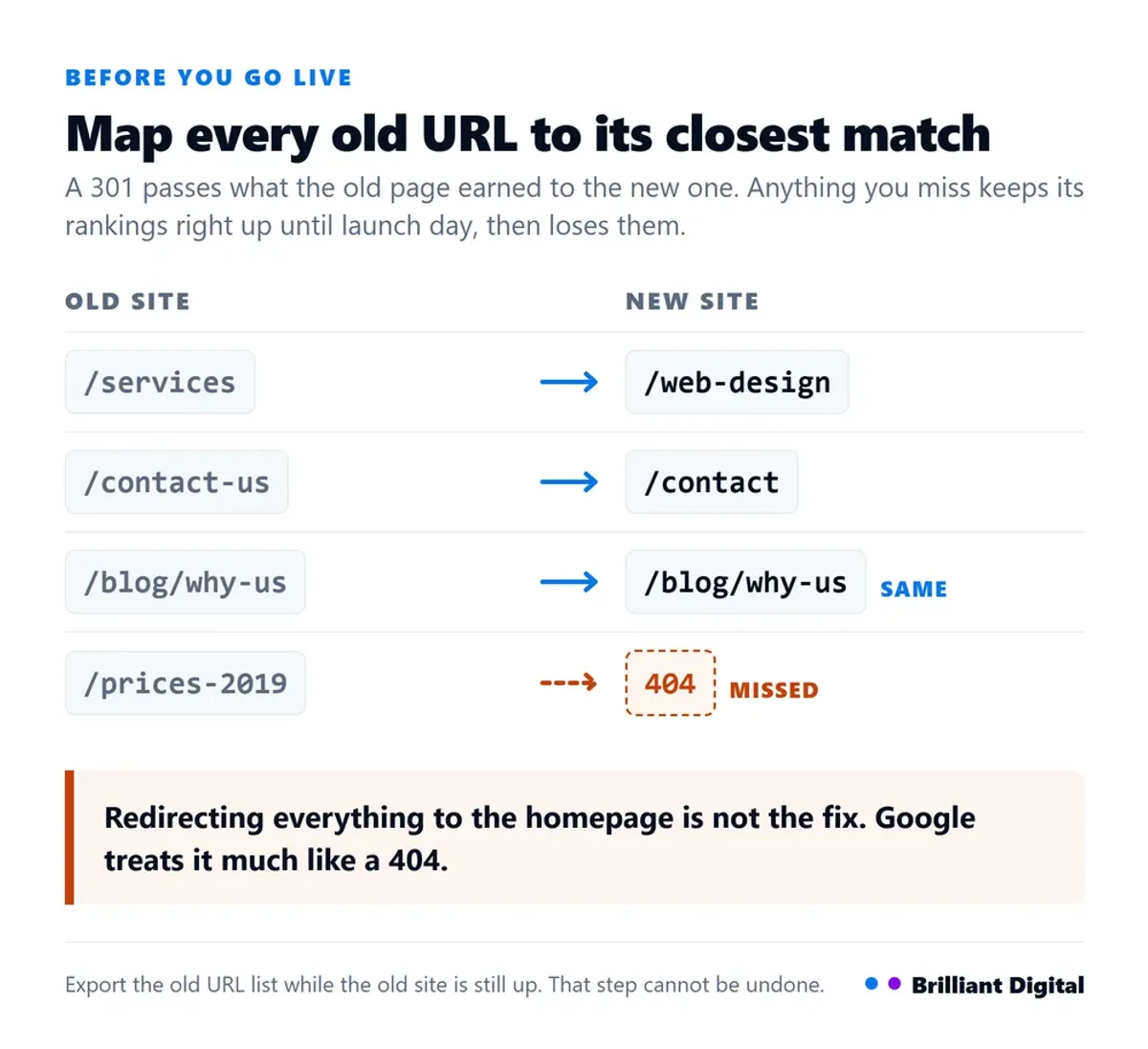
Every URL on your old website needs a 301 redirect pointing at its closest equivalent on the new one. Skip this and the rankings and backlinks you have built over years point at pages that no longer exist, Google drops them, and the traffic goes with them. It is the only launch mistake that takes away something you already had.
Here is why it gets missed so often. Everybody spends launch week looking at the new site, and the new site is fine. Nothing on it is broken. The damage is on the old site, which nobody is looking at any more, and it does not show up in your analytics because the people who would have landed there never arrive.
Export the old URL list before anything else. This is the genuinely irreversible step. Pull every indexed URL from Google Search Console, crawl the old site, and check your analytics for pages that still get traffic. Do it while the old site is still up. Once it is gone, the list is gone.
Map each one to its closest equivalent. Old services page to new services page. Old blog post to the same blog post at its new address. The word "closest" is doing real work: a redirect to a page about the same thing keeps most of the value, and a redirect to something unrelated keeps almost none.
Do not redirect everything to the homepage. It looks like a solution because nothing 404s afterwards, and it is close to worthless. Google treats a redirect to an irrelevant page much like a 404, and the visitor who wanted your pricing page now has to find it again. If there is genuinely no equivalent page, let it 404 honestly, or build the page.
Watch for chains. Old URL to second URL to third URL still works for a visitor, but it leaks value and slows the page. Point every old URL directly at its final destination. Chains build up quietly on sites that have been rebuilt more than once, because each rebuild adds a layer to the last one rather than replacing it.
Do not forget the things that are not pages. PDFs, images that have been linked to from elsewhere, and old category or tag URLs all count. On a WordPress site being rebuilt, the tag and archive URLs are usually the largest group and the first to be overlooked.
Google's own guidance on moving a site with URL changes is worth reading first. It is explicit on both points: use permanent redirects, and move section by section rather than all at once (Google Search Central).
Then test them. Not the spreadsheet, the live redirects. Pick ten real old URLs, including at least three that had traffic, and follow each one in a browser after go-live.
Before you go live: the technical checks
There are five things to verify before a website goes live: search visibility, security, tracking, functionality and rendering. Group them that way rather than working down a flat list of thirty items. Every one takes a few minutes to check, and every one of them has quietly taken a site down at some point.
Search visibility
- Remove the staging noindex. Development sites are usually blocked from search on purpose. That block ships to production far more often than anyone admits, and the symptom is a site that simply never appears in Google.
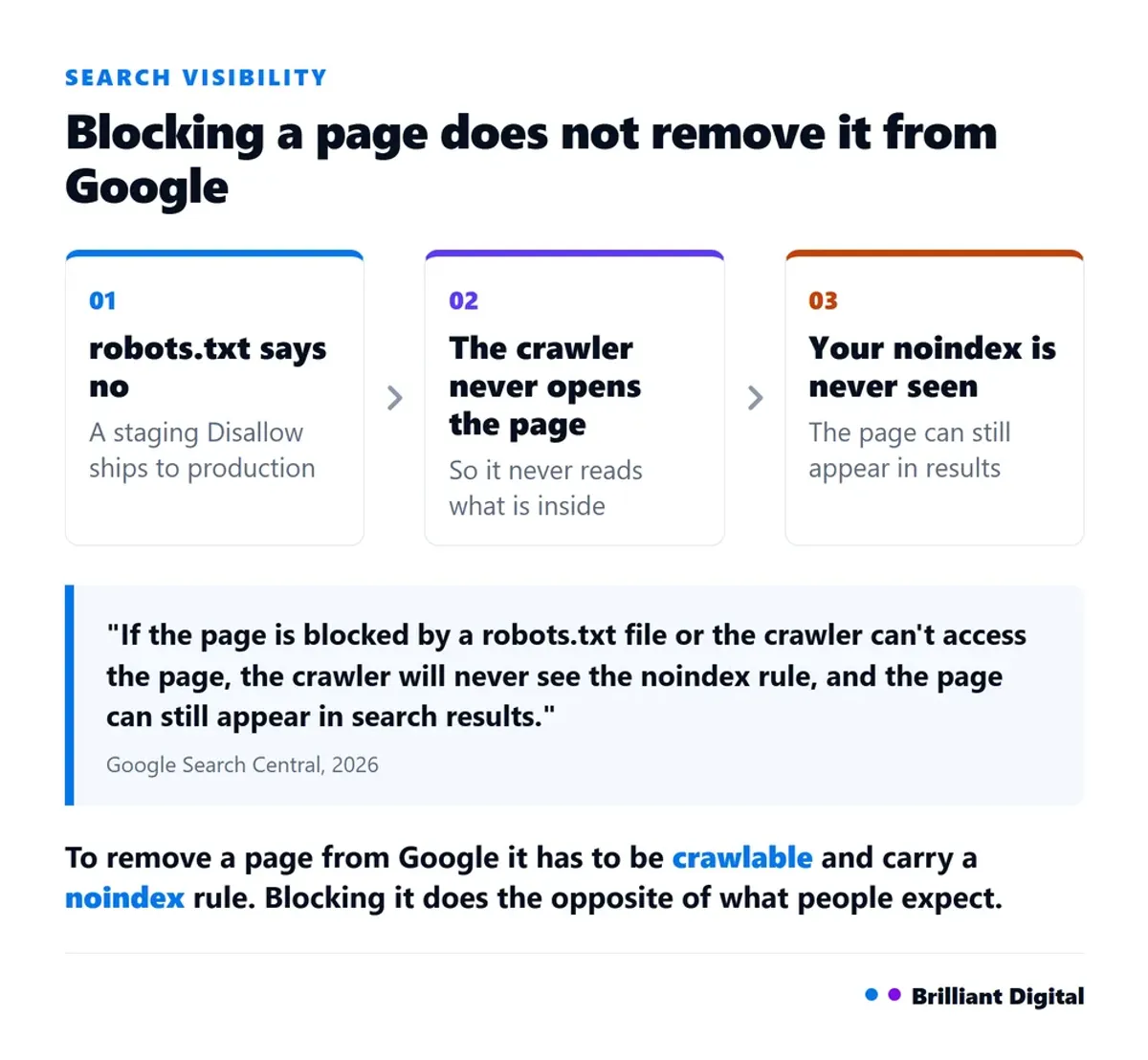
- Check robots.txt is not blocking the site. A "Disallow: /" rule left over from staging stops Google crawling anything at all.
- Understand how the two interact. If a page is blocked in robots.txt, Google never sees a noindex rule on it, because it never reads the page. Google states plainly that "if the page is blocked by a robots.txt file or the crawler can't access the page, the crawler will never see the noindex rule, and the page can still appear in search results" (Google Search Central). To remove a page from Google, it has to be crawlable and carry a noindex rule.
- Check canonical tags point at the live domain, not the staging one.
Security
- SSL certificate active on the live domain, including the www and non-www versions if both resolve.
- HTTP forced to HTTPS, so the insecure version redirects rather than serving.
- No mixed content. One image or script still loading over HTTP is enough for a browser to flag the page. If you want the detail on what browsers actually do here, we have written about why a website says Not Secure.
Tracking
- Analytics installed and confirmed recording. Installed is not the same as working. Open the live site and check a real session appears.
- Search Console verified for the live domain, and the sitemap submitted (Google Search Central).
- Conversion tracking working, if you run ads. A launch that resets your conversion tracking will quietly wreck a campaign's optimisation.
Functionality
- Submit every form as a real user would, from the live site, and confirm the notification email arrives in the right inbox.
- Check every call to action goes where it says it goes, including phone numbers on mobile.
- Test any booking, payment or login flow end to end.
Rendering
- Check on real mobile devices, not just a resized browser window. Resizing tells you the layout reflows. It tells you nothing about how it feels to use.
- Check across browsers. Chrome, Safari and Firefox at minimum, and Safari on an actual iPhone.
- Capture a page speed baseline before launch so later changes are measurable. Google's current Core Web Vitals thresholds are LCP within 2.5 seconds, INP of 200 milliseconds or less, and CLS of 0.1 or less (web.dev, 2026). Our guide to improving website speed covers what to do if you are already over them.
Launch day: the order to do things in
Sequence launch day around DNS. Point the domain at the new site, then keep the old one reachable until the new one is confirmed serving. Verify email is still flowing if the domain is moving. Do all of it early in the week, never on a Friday.
DNS does not switch instantly. When you point a domain at a new host, the change spreads across the internet over minutes to hours depending on the time-to-live values set on the records. During that window, some visitors see the new site and some still see the old one. That is normal. It is also why you do not delete anything on launch day.
Do not launch on a Friday. The honest reason is not superstition. The people who can fix a problem are about to go home for two days. A form that stops sending on Friday afternoon costs you a weekend of enquiries before anyone notices.
Protect the email. This is the failure that hurts most and gets caught last. If the domain is moving between providers, the MX records that route your email sit on the same domain as your website.
Move the site carelessly and the business stops receiving email, which is considerably worse than a broken web page, and far harder to notice: nothing bounces visibly, the inbox just goes quiet. Confirm the MX records are correct before you switch, then send a test message from an outside address afterwards. If you are setting up a domain from scratch, our guide on choosing a domain name covers the basics.
Keep the old site reachable until you have confirmed the new one is serving properly to everybody. Not live at the same address, just not deleted. Cancelling the old hosting the same afternoon is how people lose the only remaining copy of a page they had not migrated.
After go-live: the first 48 hours
Five checks in the first 48 hours. Crawl the live site for broken links. Hand-check ten real redirects. Confirm indexing has started. Capture a fresh page speed reading. Watch Search Console for 404s. All five together take under an hour and they catch almost everything that survives the pre-launch checks.
Crawl the live site. A crawler walks every link and reports what is broken. You are looking for internal links still pointing at staging or at old URLs, images that did not migrate, and pages nothing links to.
Hand-check the redirects. Take ten old URLs, paste them into a browser, and confirm each one lands on the right page in one hop. Automated redirect tests pass on badly mapped redirects all the time, because a redirect to the homepage is technically a working redirect.
Confirm indexing has started. Type site: followed by your domain into Google and see whether pages come back. Then check the page indexing report in Search Console, which tells you not just whether pages are indexed but why any of them were excluded. If nothing is appearing after a fortnight, our guide on why a website is not showing up on Google works through the causes in order.
Capture the page speed baseline again, on the live site this time. Staging environments and production rarely perform the same, because production has real traffic, real images and a real content delivery network in front of it. Take the reading now, while nobody has started changing things, so you have something honest to compare against in three months.
Watch for 404s in Search Console. This is the report that tells you which redirects you missed, and it is the reason the redirect map is never quite finished on launch day. Expect a handful in the first fortnight and add them to the map as they appear.
Check it weekly for the first month, then fold it into your normal website maintenance routine. A launch is not really finished on launch day. It is finished when a week goes by without anything new turning up in that report.
Not confident running any of this yourself? The redirect map is the part worth handing over. Tell us what you are launching and we will tell you plainly what it needs.
What usually goes wrong
Four failures account for most of the launches we have been called in to repair. A staging noindex shipped to production. Forms that submit but never notify anyone. Redirects that were mapped and never tested. Assets still loading from a site that has since been deleted.
The staging noindex. The most common and the most costly, because the site looks perfect and simply does not exist in search. It can sit like that for months if nobody checks Search Console. This is why the noindex check appears twice on this list, once before launch and once after.
Forms that submit but do not notify. The confirmation message appears. The visitor believes they have been in touch. The notification is going to an address that belonged to whoever built the site. Every enquiry in that window is lost, and the business has no idea it is losing them. Send a real submission and confirm a real person receives it.
Redirects mapped but never tested. The spreadsheet is complete and correct. The implementation has a typo in it. Nobody finds out until the rankings drop, by which point recovering them takes months.
Assets still pointing at the old site. Images and files that were never migrated, still loading from the old host, still working perfectly right up until the old hosting is cancelled. Then half the images on the site disappear at once, weeks after launch, with no obvious cause.
None of these are exotic. They are all boring, all preventable, and all much cheaper to check than to fix.

The complete website launch checklist
Here is the full website launch checklist in one place, in the order to run it. Fifteen checks before you go live, four on launch day itself, five in the first 48 hours afterwards. Copy it and tick items off as you go. The explanation for each one is in the sections above. One thing this list deliberately leaves out is the words themselves, so check your copy before you go live as a separate pass.
Before launch
- Export every URL from the old site while it is still live
- Map each old URL to its closest new equivalent
- Remove redirect chains so each old URL points straight to its destination
- Remove the staging noindex rule
- Check robots.txt is not disallowing the site
- Confirm canonical tags point at the live domain
- Confirm the SSL certificate is active and HTTP forces to HTTPS
- Check for mixed content warnings
- Install analytics and confirm it records a real session
- Verify the site in Search Console and submit the sitemap
- Confirm conversion tracking still fires, if you run ads
- Submit every form and confirm the notification email arrives
- Test booking, payment and login flows end to end
- Check the site on real mobile devices and across browsers
- Capture a page speed baseline
Launch day
- Confirm MX records so email keeps flowing
- Point DNS at the new site, early in the week, never on a Friday
- Keep the old site reachable and the old hosting active
- Confirm the new site is serving to everybody before changing anything else
First 48 hours
- Crawl the live site for broken links and missing images
- Hand-check ten real old URLs and confirm each lands correctly in one hop
- Confirm indexing has started
- Capture a fresh page speed reading on production
- Check Search Console for 404s, then weekly for a month
Frequently Asked Questions
How long does it take to launch a new website?
A small business website typically takes four to eight weeks to design and build. Launch day itself is a few hours, but DNS changes can take up to 48 hours to reach everybody. Allow a full working week either side for checks and fixes. Which end of the range you land on comes down to type and feedback speed.
How long before a new website appears on Google?
Google says it "can take a few weeks" to notice a new site or any changes to an existing one (Google Search Central, 2026). In practice, expect indexing within a few days to a few weeks, provided nothing is blocking crawling. A leftover noindex rule will prevent it indefinitely.
Do I need to redirect my old website URLs?
Yes, if any of them are indexed or have links pointing at them. A 301 redirect passes the value of the old page to the new one. Without it, that ranking and any backlinks are lost, and visitors following old links reach a 404.
Will I lose my Google rankings when I launch a new website?
Not if the redirects are mapped correctly and the content stays comparable. Expect some short-term fluctuation for a few weeks while Google recrawls. Lasting losses almost always come from missing redirects, redirecting everything to the homepage, or content that was cut during the rebuild.
What should I check the day after launching?
Check that forms are sending notifications, that ten sample old URLs redirect correctly, that no staging noindex survived, that analytics is recording, and that Search Console is not reporting a surge of 404s. Those five cover the failures that cost real money.
What to do next
Run the checklist above before you go live, and again in the 48 hours afterwards. Most of it takes minutes. The redirect map is the one that takes real time, and it is the one worth paying for if you are not confident doing it yourself.
Launching in the next few weeks. Start with the redirect export today, while the old site is still up. Everything else on this list can be done later. That one cannot.
Not confident running it yourself. Fair enough. We handle launches for clients as part of building the site: the redirect map, the search visibility checks and the post-launch crawl. Have a look at what we do, or tell us what you are launching and we will tell you honestly what it needs.
Already live and working. The technical job is done and the marketing one starts. That is a different list, and we have written it up separately: how to market a new website in its first 30 days.