
You paid for a website. It looks great. But when you search for it on Google, it is nowhere to be found. It is one of the most frustrating things a business owner can run into, and we hear it most weeks.
Here is the honest answer. If your website is not showing up on Google, it is almost always one of three things: Google has not indexed it yet, something on your site is blocking Google, or it is indexed but not ranking for the terms you care about. Each has a different fix, and most you can check yourself in a few minutes.
This guide walks through how to tell which problem you have, then the specific reasons behind each one, with a practical fix for every single one.
Key Takeaways
- Indexed and ranking are two different problems. Work out which one you have before you change anything, or you will waste hours fixing the wrong thing.
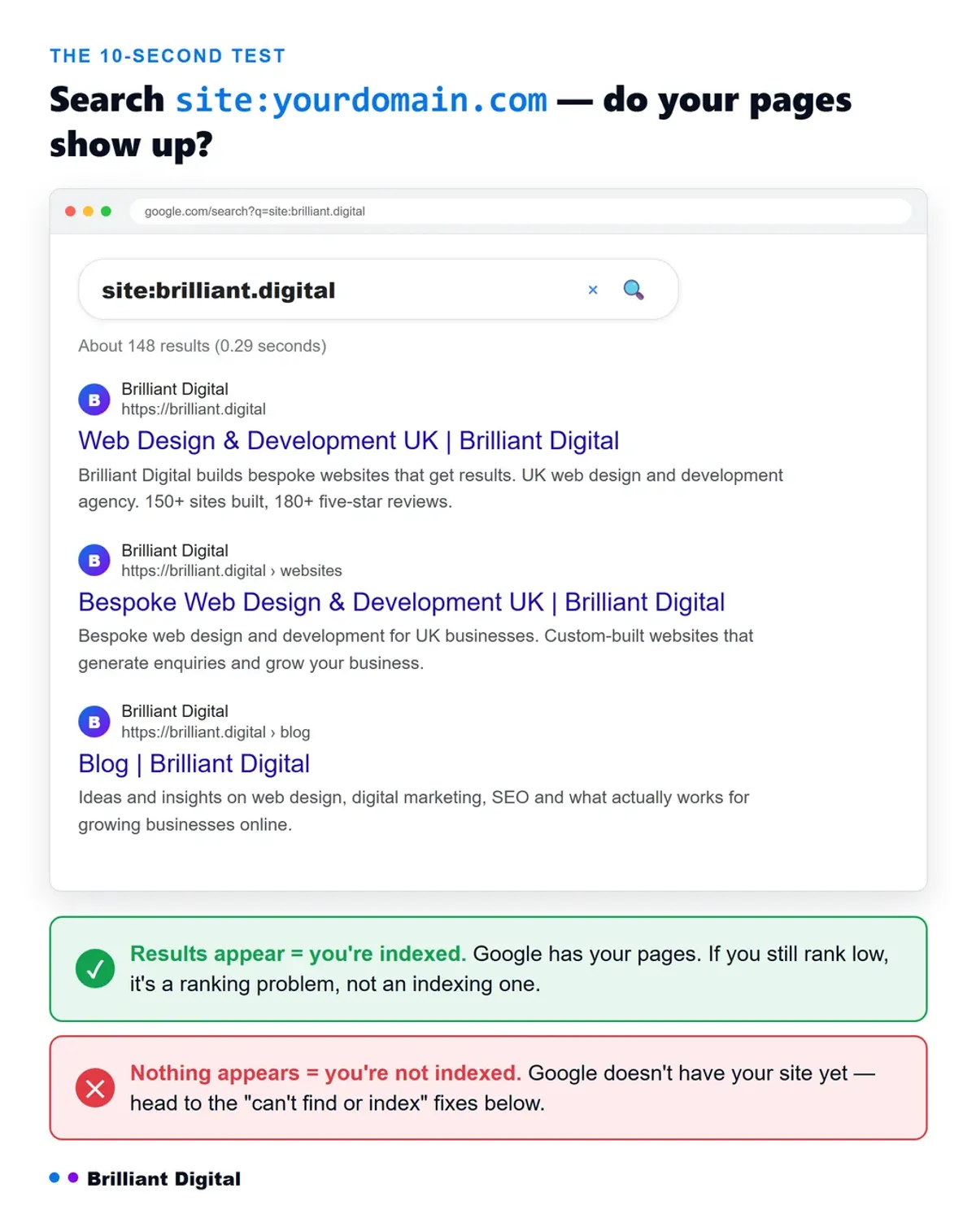
- The 10-second test is site:yourdomain.com. Type it into Google. Results mean you are indexed. No results mean you are not.
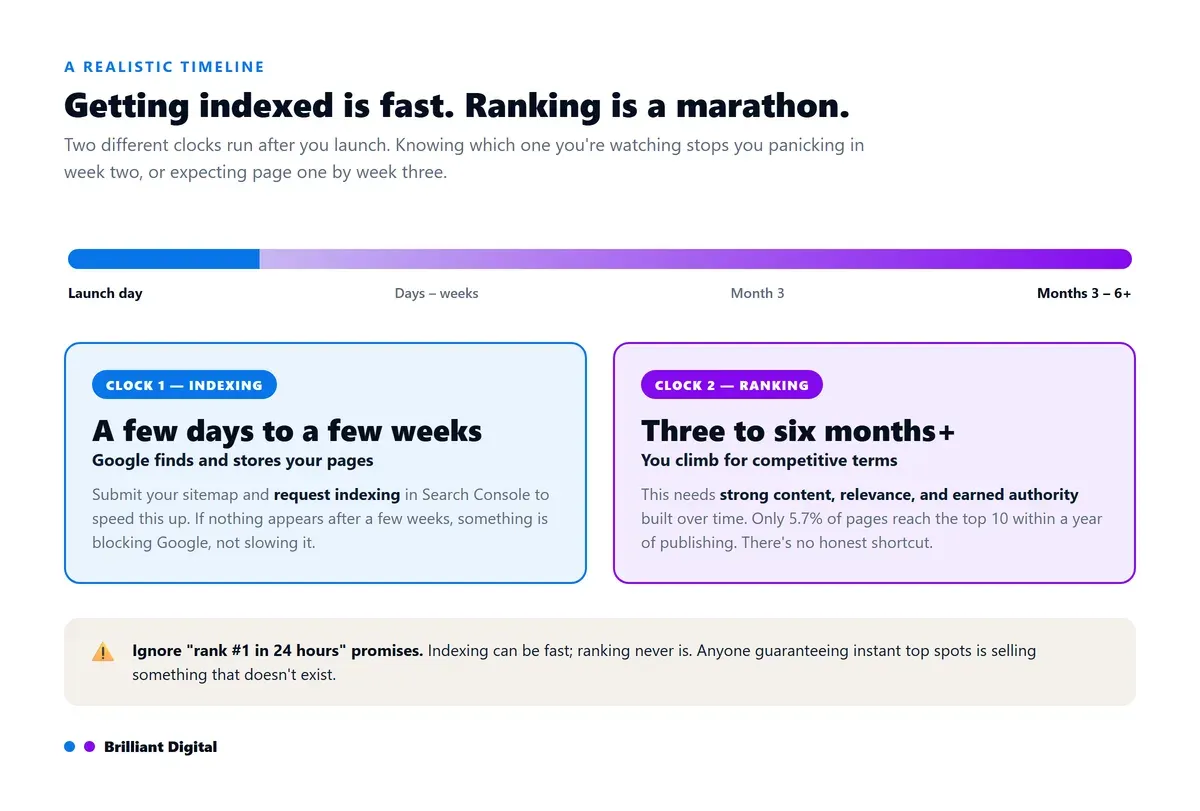
- New websites take time. Expect a few days to a few weeks to get indexed, and three to six months of consistent work to rank for competitive terms.
- Most causes are DIY-fixable inside a free tool called Google Search Console. A handful are technical enough to be worth a professional.
- A "noindex" setting left on after launch is the single most common cause we find, especially on WordPress sites.
First, work out which problem you actually have
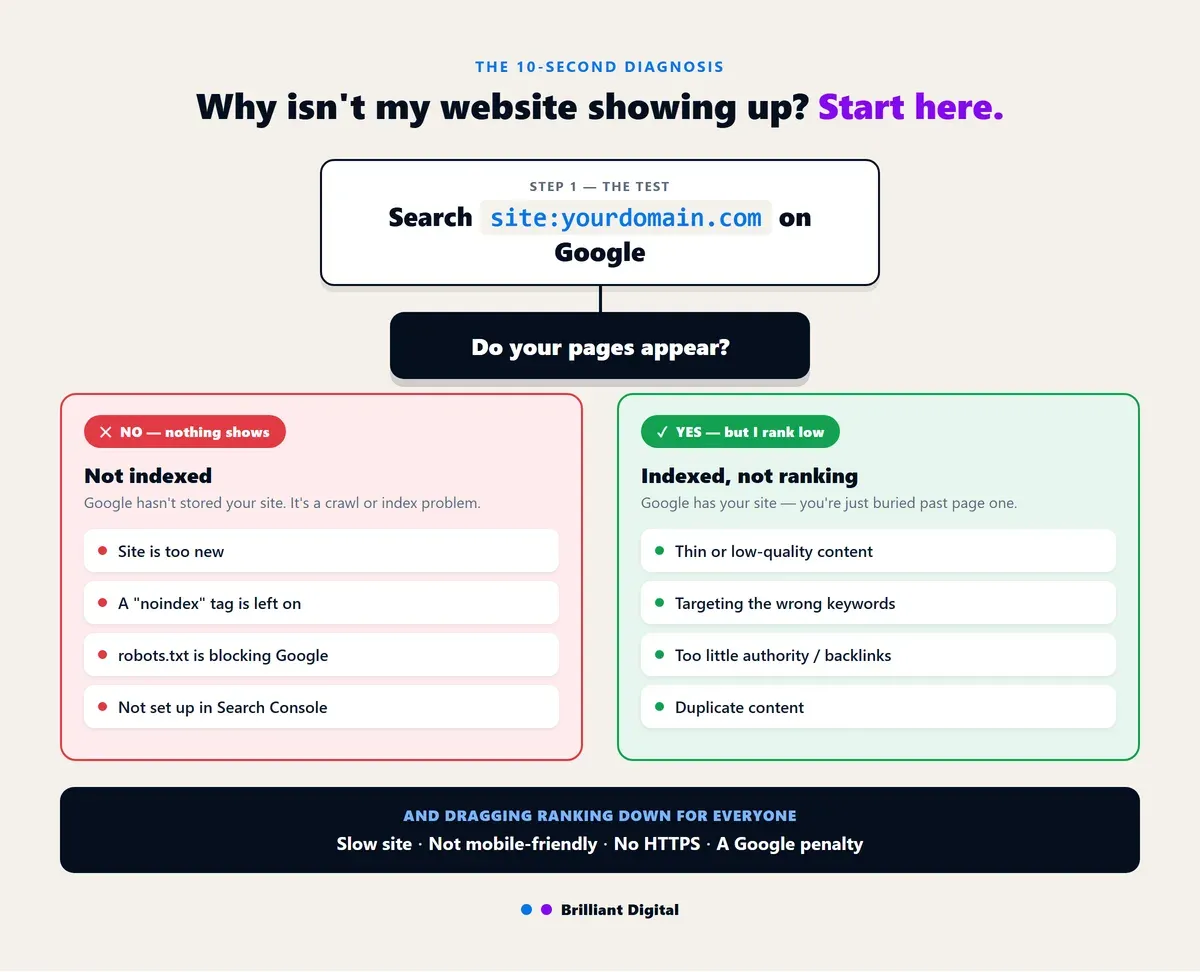
Before you touch anything, find out whether Google has your site at all. Go to Google and search site:yourdomain.com, swapping in your real address. If your pages appear, you are indexed, and this is a ranking problem. If nothing appears, Google does not have your site, and this is a crawling or indexing problem.
This one check saves hours, because the two problems have completely different fixes. "Indexed" means Google has stored your pages. "Ranking" means where those pages appear when someone searches. A page can be indexed and still sit on page nine.
The tool that answers all of this properly is Google Search Console, a free service from Google that shows you exactly how it sees your site. If you take one action from this article, set that up. Here is how the two paths break down.
- A site: search shows nothing: you are not indexed, which is a crawl or index block. Start with the sections below on new sites, noindex, and robots.txt.
- A site: search shows your pages, but you rank low: you are indexed but not ranking. Focus on the sections on content, keywords, and authority.
- You were there, but now you are gone: a change broke something. Check noindex, robots.txt, SSL, or a penalty.
Every reason your site might be hidden, and its fix
Here is the whole article at a glance. Find the reason that sounds like your situation, then jump to its section below for the detail. If your site: search came back empty, start with the "Not indexed" group. If it showed your pages, start with "Not ranking."
Not indexed — Google can't find your site:
- Your site is too new: verify it in Search Console, submit your sitemap, and request indexing.
- A "noindex" tag is left on: untick WordPress's "Discourage search engines" box, remove the tag, and reindex.
- robots.txt is blocking Google: remove the stray Disallow: / line at yourdomain.com/robots.txt.
- You are not set up in Search Console: verify the site, submit your XML sitemap, and request indexing.
Not ranking — Google has your site, but you're buried:
- Thin or low-quality content: cover your topics properly and write from real experience (E-E-A-T).
- Targeting the wrong keywords: match the page to search intent and use specific, less competitive terms.
- Too little authority or backlinks: earn links by being genuinely useful and get listed in reputable directories.
- Duplicate content: add canonical tags and redirect duplicate URLs to one version.
Technical problems dragging you down:
- Your site is too slow: run PageSpeed Insights, then fix oversized images, caching, and bloated code.
- Not mobile-friendly: test on a real phone and fix the mobile layout.
- Not secure (no HTTPS): install an SSL certificate and move the site to HTTPS.
A Google penalty:
- A manual action: check Manual Actions in Search Console, fix the issue, then request reconsideration.
When Google can't find or index your site
If that search came back empty, Google has not added your pages to its index. It cannot show a page it has never stored. There are four common reasons, and all four are fixable from Search Console.
Your site is simply too new
Google finds new pages by crawling links and reading sitemaps, and that takes time. A brand new site can take anywhere from a few days to a few weeks to get indexed. If you launched last week and your search comes back empty, this is the most likely cause. Verify the site in Search Console, submit your sitemap, then use the URL Inspection tool to request indexing for your key pages. That is the fastest legitimate way to nudge Google along.
A "noindex" tag is quietly blocking Google
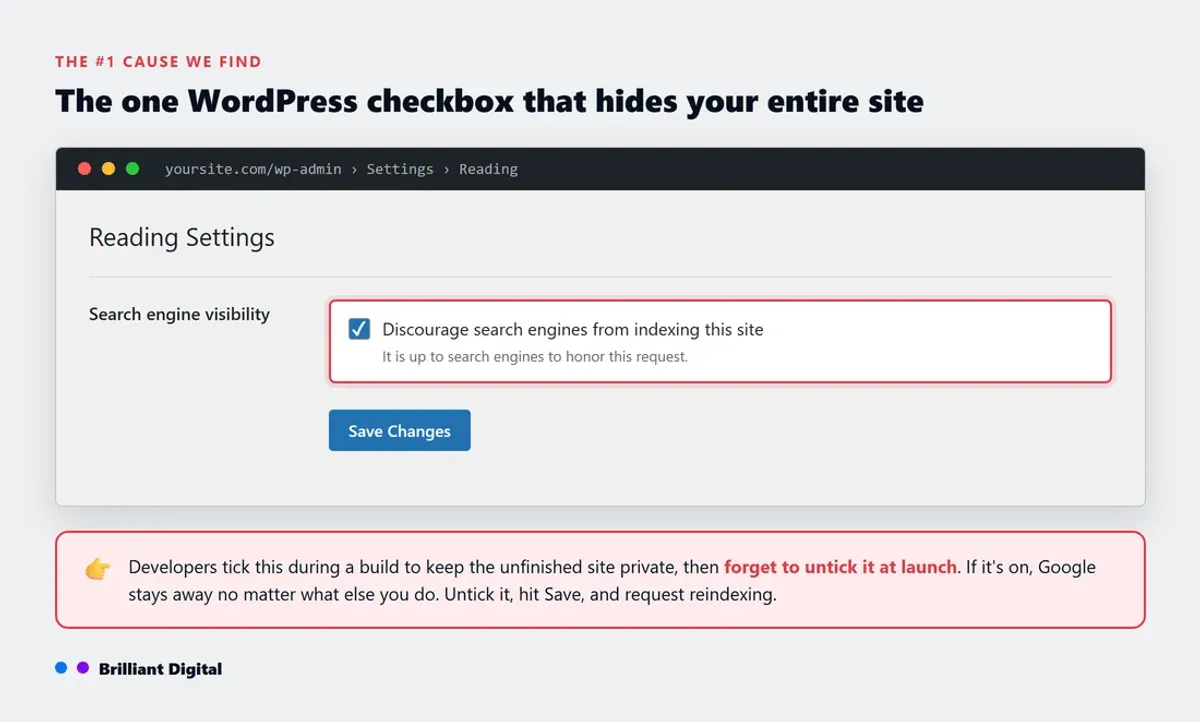
A noindex tag is a line of code that tells search engines not to add a page to their index. It is the most common cause we find, and it is almost always an accident. On WordPress, there is a setting under Settings then Reading called "Discourage search engines from indexing this site." Developers tick it during a build so the unfinished site stays private, then forget to untick it at launch. If it is on, Google stays away no matter what else you do. Untick it, save, and request reindexing. If the site was rebuilt recently, check this first: a staging noindex that shipped to production is the classic launch bug.
Your robots.txt is blocking the crawler
Your robots.txt file tells search engines which parts of your site they are allowed to crawl. One stray line, Disallow: /, locks Google out of everything. You can view yours by going to yourdomain.com/robots.txt in a browser. If you are not confident reading it, this is worth checking carefully, because a single wrong line here undoes every other bit of good work on the site.
You have not set up Search Console or submitted a sitemap
If Google does not know your site exists, it will not go looking for it. A sitemap is a simple file that lists all your pages so search engines can find and understand them. Set up Search Console, verify you own the site, submit your XML sitemap, then use the URL Inspection tool to request indexing for your homepage. From there, the Page Indexing report tells you exactly which pages are in and which are not, and why.
When you're indexed but not ranking
If that search does show your pages, the good news is Google has your site. The problem is visibility. Your pages are ranking too low to be seen, often buried well beyond page one. This is the classic "I show up when I search my business name, but not for my services" situation. It comes down to relevance and trust. If that is where you are, the practical next step is working through the fixes that actually improve your Google ranking, starting with the ones that move the needle most.
Your content is thin or low quality
Google rewards content that genuinely helps the person searching. A handful of pages with a few lines of text each gives it very little reason to rank you above established competitors. The old "300 words minimum" figure is a floor, not a target. Cover your topics properly, answer the real questions your customers ask, and keep pages useful. Depth beats volume every time.
Part of what Google looks for here has a name: E-E-A-T, which stands for experience, expertise, authoritativeness, and trustworthiness. In plain terms, it wants to see that real, knowledgeable people wrote your pages, that other reputable sites trust you, and that your business is genuinely who it claims to be. A page written by someone who has actually done the work will almost always beat a thin, generic one. Google's own Search Essentials spell out what they expect.
You are targeting the wrong keywords
You might have a strong page that answers a different question from the one people are typing. If someone searches "emergency plumber Leeds" and your page is a general "our services" page, Google has better, more specific matches to show. Look at what already ranks for your target term, work out the intent behind it, and make sure your page clearly satisfies that intent. Broad, competitive terms are also the hardest to win, so more specific phrases often bring the right people faster.
Your site lacks authority and backlinks
A backlink is a link from another website to yours, and Google treats them as votes of confidence. A brand new site with no links has little authority, which makes ranking for competitive terms hard. Earn links by being genuinely useful, get listed in reputable industry directories, and publish content worth linking to. Avoid anyone selling cheap bulk links, which do more harm than good. This is slow work, and there is no honest shortcut. For context, only 5.7% of pages that rank in Google's top ten got there within a year of being published (Ahrefs, 2017). Ranking is a marathon.
Duplicate content is splitting your signals
If the same content lives on several URLs, Google may not know which version to show and can end up showing none of them prominently. This happens with www versus non-www, HTTP versus HTTPS, or repeated text across pages. Use canonical tags to tell Google which version is the original, and redirect the duplicates. It keeps your ranking signals pointing at one clear page instead of scattered across several.
If your site is indexed but not ranking, the fix is rarely one thing. It is content, relevance, and authority working together over time. This is where investing in SEO before paid ads, or running both together, becomes a real strategic decision rather than a guess. If you are still weighing up whether that investment is worth making, we make the full case in why SEO matters for small businesses, including what staying invisible quietly costs you.
Technical problems that quietly bury you
Some reasons have nothing to do with your content and everything to do with how the site is built. Three come up again and again, and Google treats all three as ranking factors. The frustrating part is they are often invisible until someone checks.
- Your site is too slow. Slow sites lose rankings and, more importantly, lose visitors before they ever enquire. Run your pages through PageSpeed Insights, then fix the big issues: oversized images, no caching, bloated code.
- Your site is not mobile-friendly. Google predominantly uses the mobile version of your site to decide how to rank it. If your site is cramped or broken on a phone, that is the version being judged. Test it on a real handset, not just a shrunk browser window.
- Your site is not secure. Google has treated HTTPS as a ranking signal since 2014, and browsers now warn visitors away from sites showing "Not secure." If yours does, you need an SSL certificate installed and the site properly moved to HTTPS.
Here is the honest pattern behind most of these: they are build-quality problems. A site put together properly ships fast, works on mobile, and runs on HTTPS by default. It is a big part of why we build on a modern stack using tools like Astro and Cloudflare, where slow, insecure pages are not something a client has to think about. If your site keeps throwing up technical issues, the platform underneath it may be the real problem.
The rare but serious one: a Google penalty
Occasionally, a site is not showing up because Google has applied a manual action, meaning a person at Google has penalised it for breaking the rules. This is uncommon, so do not assume it first, but it is worth ruling out. Penalties come from spammy tactics like bought links, keyword stuffing, or hidden text. Check Search Console under Manual Actions. If there is an issue, it tells you what it is, and you fix it then submit a reconsideration request. Rankings can recover, but it takes time.
Platform-specific reasons your site might be hidden
The exact fix often depends on what your site is built on, because each platform hides its indexing settings in a different place. If you built your own site, the cause is frequently a single setting you did not know was there. Here is where to look first on the most common platforms.
- WordPress: usually the "Discourage search engines" box left ticked, or a Yoast/SEO plugin noindex. Fix it under Settings then Reading, or in your SEO plugin's settings.
- Wix: usually an indexing delay on new sites, or SEO settings toggled off. Check the SEO tools dashboard and connect Search Console.
- Squarespace: commonly pages hidden from navigation, or the site is simply too new. Check your site pages settings and the SEO panel.
- GoDaddy Website Builder: often the site is not published, or search visibility is toggled off. Publish the site, then check site settings then search engine visibility.
If you searched something like "why is my Squarespace website not showing up on Google" or the same for GoDaddy or Wix, start with the platform setting above, then work back through the general checks in this article. Nine times out of ten it is the setting, not the platform.
Not showing up in AI search either?
Increasingly, "being found" means more than the blue links. People now ask ChatGPT, Perplexity, and Google's own AI Overviews for recommendations, and those tools cite websites in their answers. If you are invisible on Google, you are almost certainly invisible there too.
The reassuring part is that the fundamentals overlap. AI tools tend to cite content that is indexed, well structured, clearly written, and trusted, which is exactly what ranking on Google rewards. Fix the basics in this article and you improve both at once. It is early, and getting the groundwork right now is how you show up as this shifts.
Your action plan: what to do right now
If you want a straight checklist to work through today, here it is in order. Each step takes minutes, not hours.
- Search site:yourdomain.com on Google to see whether you are indexed at all.
- Set up and verify Google Search Console if you have not already.
- Run the URL Inspection tool on your homepage to check its status.
- Submit your XML sitemap through Search Console.
- Check for a stray noindex setting: the WordPress "Discourage search engines" box, plugin settings, and your robots.txt file.
- If you are indexed but not ranking, shift focus to content quality, search intent, and earning links.
- Give it time. Indexing happens in days to weeks, ranking in months.
When to fix it yourself, and when to call someone
Most of this list is genuinely DIY. Ticking the right box in WordPress, submitting a sitemap, or setting up Search Console are things any business owner can do in an afternoon, and you should, because they cost nothing.
It is worth getting help when the problem is stubborn or technical: persistent indexing errors you cannot explain, a suspected penalty, a robots.txt you are nervous about touching, or a site that is fundamentally slow, insecure, or thin. At that point, more guesswork is expensive, and a proper diagnosis is faster.
That is a lot of what we do. We have spent over ten years and built more than 150 websites for UK businesses, and getting sites found on Google is part of the job. If you have worked through this and your site is still hiding, tell us about your business and we will take a look and come back to you honestly about what is going on. No hard sell, just a straight answer. If you would rather start further back, our website design service is built around sites that are fast, findable, and made to bring in enquiries, not just look good. It also helps to know what makes a good website in the first place, and how publishing useful content regularly is one of the most reliable ways to get found over time.
Frequently Asked Questions
How do I check if my website is indexed by Google?
Search site:yourdomain.com in Google, using your real domain. If your pages appear in the results, your site is indexed. If nothing appears, Google does not have your site yet, and you should verify it in Google Search Console and submit your sitemap to get the process started.
Why does my website show up when I search its name but not for my services?
That means you are indexed but not ranking for competitive terms. Google has your site, but sees other pages as more relevant or trusted for those searches. It is a content, relevance, and authority issue rather than an indexing one, so focus on stronger content, matching search intent, and earning quality backlinks.
How long before a new website ranks on Google?
Expect indexing within a few days to a few weeks, and meaningful rankings for competitive terms within three to six months of consistent, quality work. Requesting indexing in Search Console speeds up the first part. There is no legitimate shortcut for the second, so treat instant number-one promises with caution. For the search side of that, we have set out how long SEO takes to work in more detail.
Why did my website suddenly disappear from Google after being there before?
The usual culprits are an accidental noindex tag added during a redesign, a change to your robots.txt file, a lapsed SSL certificate, or, more rarely, a manual penalty. Check Google Search Console first. Its Page Indexing and Manual Actions reports usually point straight at what changed.
Is Google Search Console free?
Yes. Google Search Console is completely free, and it is the single most useful tool for understanding why your site is or is not appearing in search. It shows your indexing status, crawl errors, the queries you appear for, and any manual penalties, all from Google directly.
How do I force Google to index my site?
You cannot truly force it, but you can request it. In Google Search Console, use the URL Inspection tool, enter the page you want indexed, and click Request Indexing. This adds your page to Google's crawl queue. Submitting an up-to-date sitemap and earning links to the page also help Google find it faster.
How do I get my website to show up on Google?
First, get it indexed: verify the site in Google Search Console, submit your sitemap, and check that no "noindex" tag or robots.txt rule is blocking it. Then make sure the page actually targets what people search for. Google can only rank you for the keywords and questions your content genuinely covers, matched to search intent. From there, strong, relevant content and quality backlinks lift your position over time.