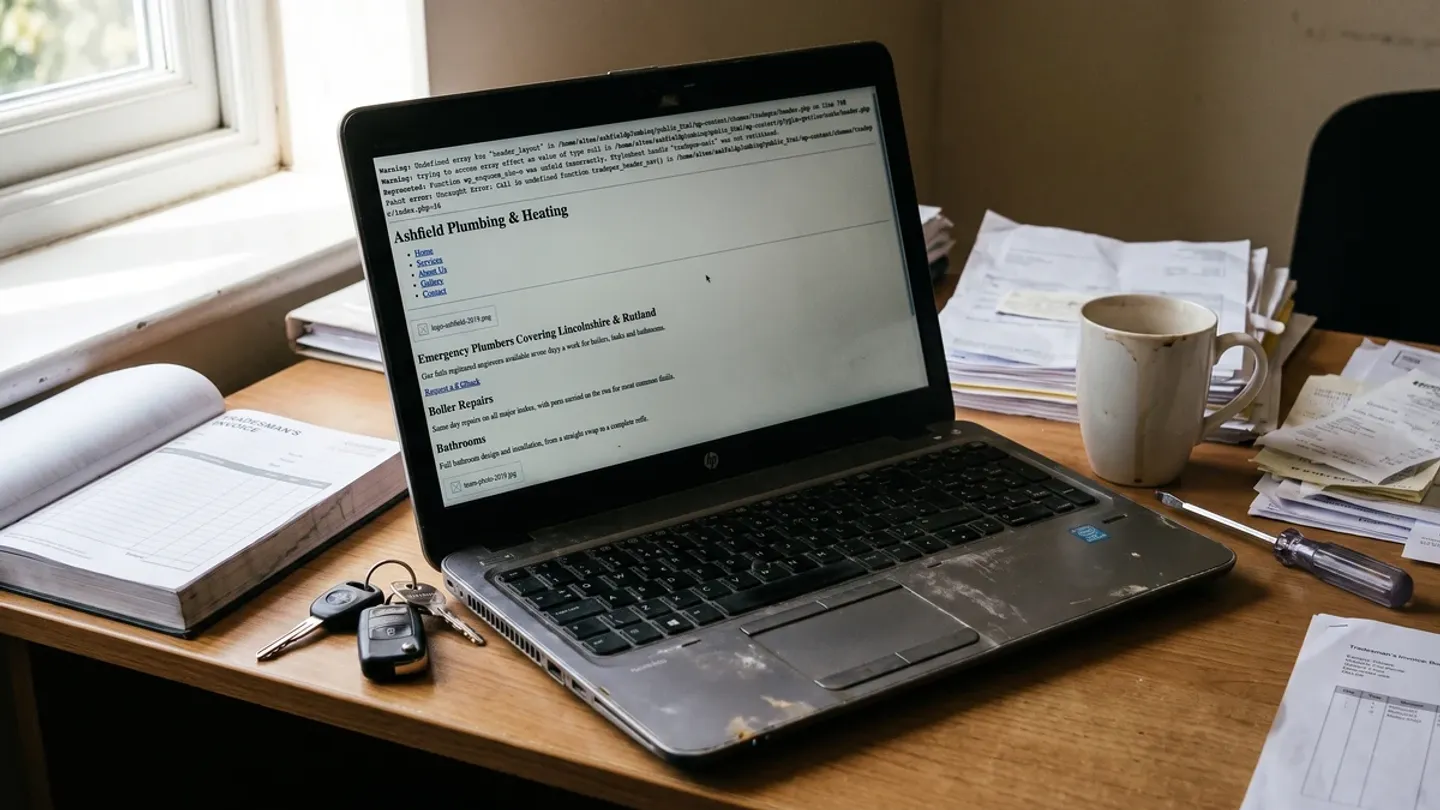
Most business owners meet the phrase "website maintenance" in one of two ways. Either a quote lands in the inbox for a monthly plan nobody quite explained, or something breaks and somebody says it broke because the maintenance was skipped.
Both leave you with the same question: is this a real need, or a well-sold one?
The honest answer is that it is both, because two completely different things get sold under the same two words.
The first is platform upkeep: updates, patches, security scanning, compatibility testing. How much of that you need depends almost entirely on what your site is built on, and for a lot of businesses it is far less than they are paying for.
The second is having someone who can change your website. A new page when you take on a service, a section that needs rewriting, prices that moved in January, a layout that no longer works on a phone. That has nothing to do with your platform. Every website needs it, and it is the half that usually gets buried in the quote.
Most maintenance plans are priced on the first and sold as though they cover the second. We built over 100 WordPress websites and managed more than 50 of them every month for the better part of a decade, so we have done the work being described. We also stopped, which is why we can say plainly which parts of it were genuinely necessary and which parts existed only because of the platform underneath.
Key Takeaways
- Two different things are sold as "website maintenance": platform upkeep, and access to a person who can change your site. Most quotes price the first and imply the second.
- Platform upkeep is largely a WordPress problem. Plugin updates, core updates, security plugins and compatibility testing exist because of the platform, not because you have a website.
- 96% of WordPress vulnerabilities in 2024 were found in plugins, not in WordPress itself (Patchstack, State of WordPress Security 2025). Third-party plugins create most of the risk and most of the work.
- Needing someone to change things applies to every platform. WordPress, Webflow, Shopify or a bespoke build: none of them update your own opening hours.
- Published UK maintenance plans run from roughly £30 to £500 a month. Judge one by how much human time it includes, not by its task list.
What is website maintenance?
Website maintenance is the routine work that keeps a website secure, available and accurate after it has launched. It splits into the two halves above: upkeep, which keeps the thing running and depends almost entirely on your platform, and changes, which keep the thing useful and depend on your business rather than your software.
You will see the same thing called web maintenance, website support, or a website care plan. The terms are used interchangeably in the UK market and none of them has an agreed definition, which is part of why quotes vary so widely. Website maintenance services from two providers can share a name and contain almost nothing in common.
Almost every quote you will be sent blurs the two halves together. The rest of this article is about telling them apart, because that is what decides whether a price is fair.
What every website genuinely needs
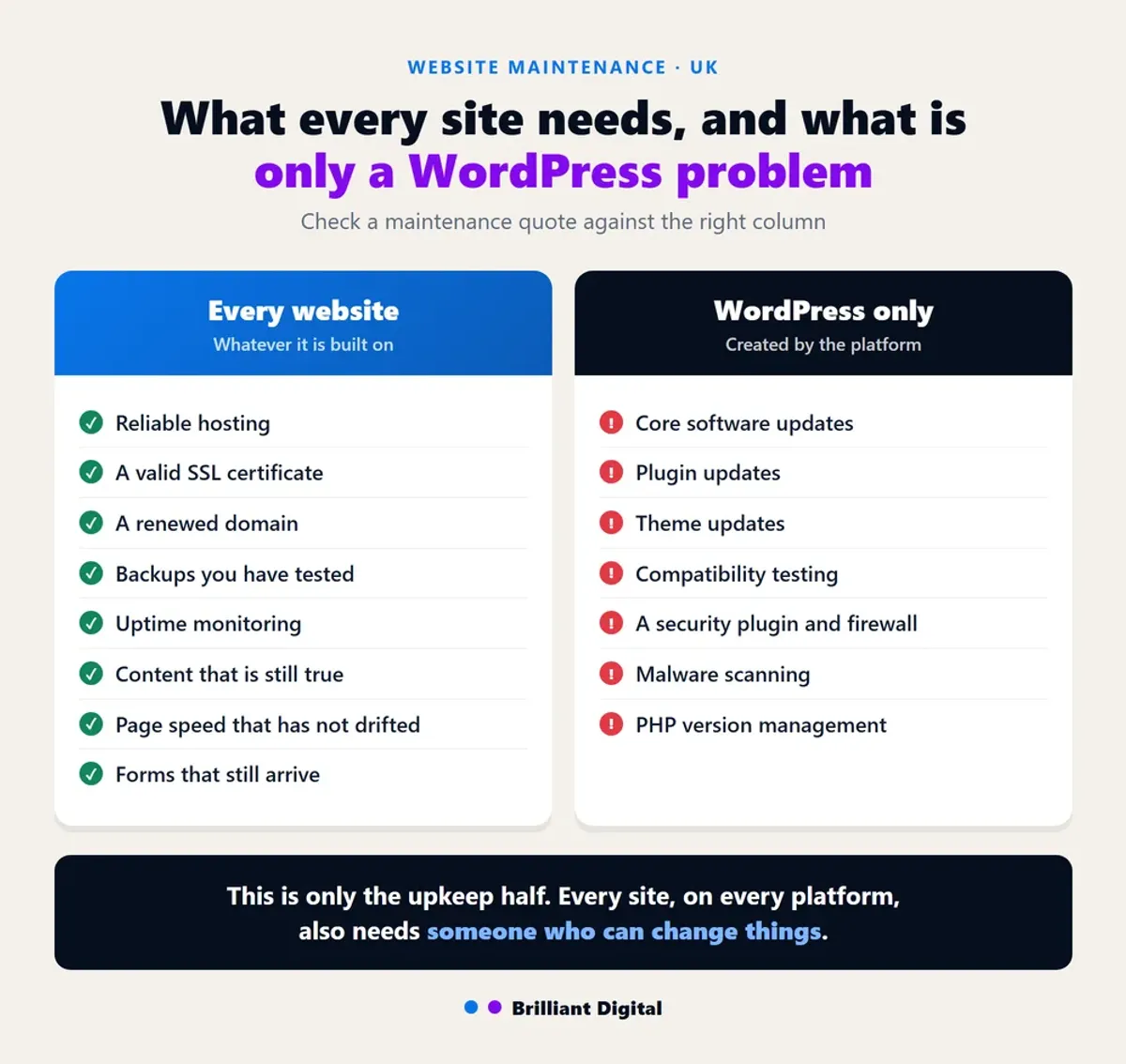
Every website, whatever it is built on, needs the same eight things: reliable hosting, a valid SSL certificate, a renewed domain, tested backups, uptime monitoring, accurate content, page speed that has not drifted, and contact forms that still deliver. That is the genuine list, and it is considerably shorter than most maintenance plans imply.
- Somewhere reliable for it to live. Hosting that stays up, with someone who notices when it does not. This is usually the largest fixed cost of keeping a site online, and we have broken it down in our guide to how much it costs to host a website in the UK.
- A valid SSL certificate. If it lapses, browsers warn visitors away before they reach your content. If you have ever seen that warning on your own site, we explain what causes it in why your website says "not secure".
- A domain that gets renewed. Unglamorous, and the single most common way a business loses its website entirely.
- Backups you have actually tested. An untested backup is a belief, not a safety net. Restoring one once a year is the only way to know.
- Uptime monitoring. Knowing your site is down before a customer tells you.
- Content that is still true. Old prices, departed staff, discontinued services and dead links do more quiet damage than any technical fault.
- Speed that has not drifted. Pages get slower as images and scripts accumulate. Google treats page experience as a genuine ranking consideration (Google Search Central), and we cover the fixes in order of impact in our guide to improving website speed.
- Forms that still arrive. Contact forms fail silently and often. Test yours monthly by sending one.
That list applies to a bespoke site, a WordPress site, a Shopify store and a Squarespace page alike.
What is worth knowing is that on decent modern hosting, four of the eight look after themselves. SSL renews automatically, backups run on a schedule, uptime monitoring is set up once and then just watches, and the hosting either stays up or it does not. Nobody should be billing you a monthly fee to perform those.
The other four need a human, and they are the ones that actually get skipped: restoring a backup to prove it works, noticing the domain renewal email, checking the forms still deliver, and keeping the content true. None of them take long. All of them need somebody whose job it is.

The half nobody calls maintenance: someone who can change things
Every website needs somebody who can change it, and this has nothing to do with what it is built on. A new page when you take on a service. The photos swapped when the van gets a new livery. Prices that moved in January. A section that is not pulling its weight. A notice up before you close for Christmas.
None of that is upkeep. All of it is the difference between a website that still earns its keep in three years and one that quietly drifts out of date.
It is worth being blunt about this, because the first half of this article can read as "you probably do not need anyone". You do. A site that is perfectly patched and tells visitors you close on Tuesdays when you no longer do is still a broken website. Astro, Webflow, Shopify, a bespoke build: none of them update your own opening hours.
So the useful question is not does my platform need maintaining. It is when I want something changed, who does it, how quickly, and what does it cost me? There are two honest answers:
- Pay as you go. Ring whoever built it when you need something. Sensible if you change things rarely. The catch is that nobody is holding your file, so every job starts with somebody working out how your site fits together, and you pay for that time.
- A retained arrangement. A set number of hours a month with the people who built it. You pay in the months you need nothing, and in exchange you get a known response time and somebody who already knows the site.
Neither is wrong, and which one suits you is mostly a question of how often you change things. What is wrong is paying every month for plugin management on a site that has no plugins, and still having nobody to ring when you want a new page.
Whichever you pick, agree four things before you sign, because these are what people actually fall out over:
- How you ask. An email address, a form, a phone number. One route, not "whoever picks up".
- How long it takes. A stated turnaround for ordinary changes, and a different one for urgent.
- What counts as small. Swapping a photo is not the same as adding a page. Get the line drawn while everyone is still friendly.
- What happens to bigger jobs. Quoted separately, or drawn from the same hours? Both are fine. Not knowing is not.

Why most website maintenance advice is really WordPress advice
So why does almost everything written about website maintenance describe something much narrower than the two halves above? Because of what most websites happen to be built on. Search the term and nearly every result will tell you to update your plugins, update your core software, run malware scans, install a security plugin and test for compatibility after each update. That advice is not wrong. It is just specific to one kind of website.
WordPress powers 40.2% of all websites and 58.7% of those running a known content management system (W3Techs, September 2026). When a platform is that dominant, the generic advice written about "websites" is quietly written about that platform.
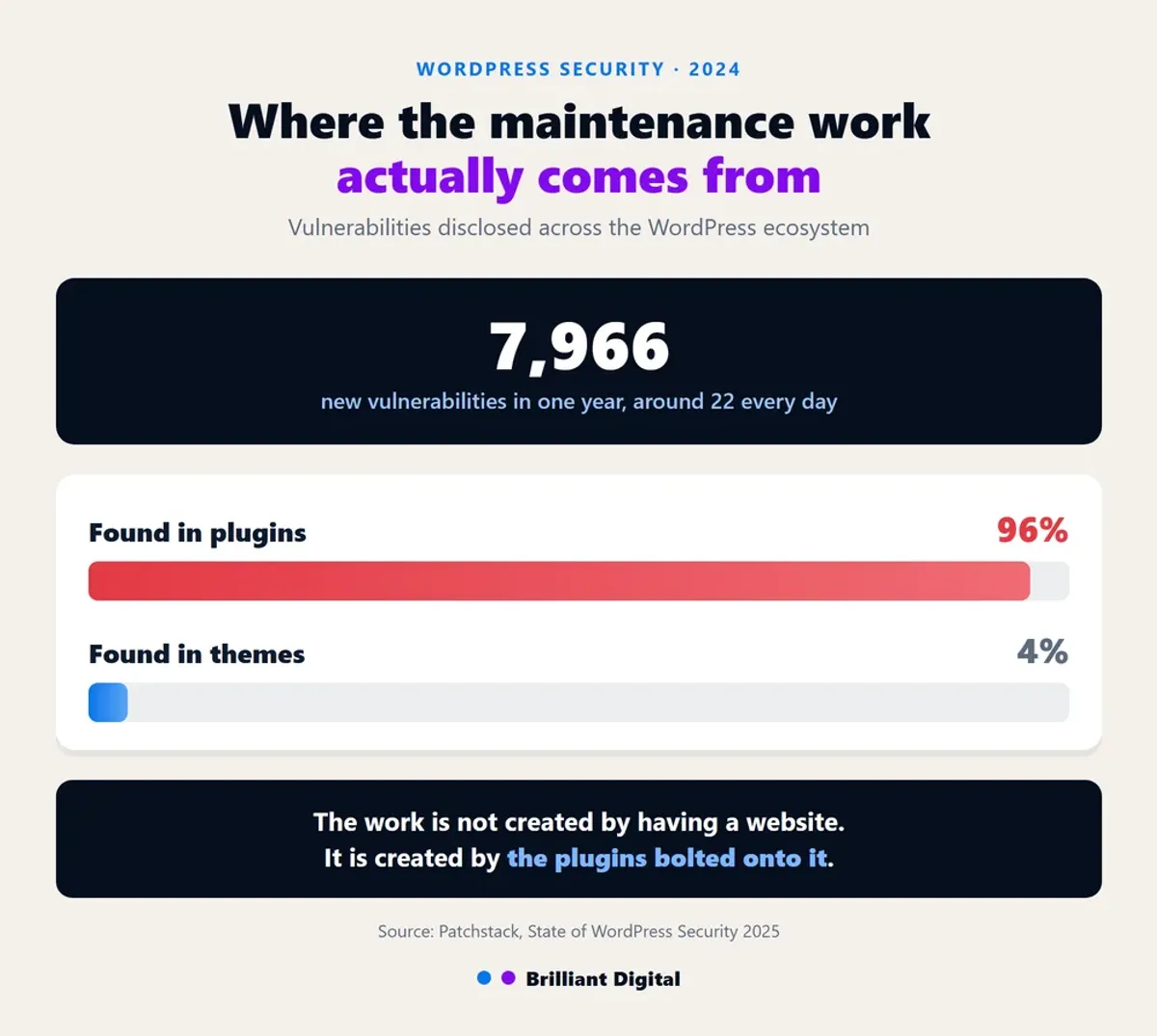
The scale of the upkeep is not a matter of opinion. In 2024, 7,966 new vulnerabilities were disclosed across the WordPress ecosystem, around 22 every day, and 96% of them were in plugins rather than in WordPress itself (Patchstack, *State of WordPress Security 2025*).
That figure is the whole argument. The work is not created by having a website. It is created by running one assembled from third-party plugins, each maintained by a different developer, each able to break the others when updated.
This is not an attack on WordPress. We used it happily for seven years. But the cause and effect is worth stating: a monthly upkeep bill is usually the cost of a platform decision, not an inherent cost of being online. That was one of the larger reasons we stopped using WordPress.
What only WordPress and plugin-based sites need
Everything below exists because of the platform, not because of the website. If your site is not built on WordPress or a similar plugin-driven system, you should not be paying for these.
- Core software updates, applied promptly and in the right order (WordPress.org documentation).
- Plugin updates, which is where 96% of the vulnerabilities live.
- Theme updates, with the associated risk of overwriting customisations.
- Compatibility testing after every update, because any of the above can break the others.
- A security plugin and a firewall, to defend a surface the plugins created.
- Malware scanning, for the same reason.
- PHP version management, which quietly breaks older plugins when the host upgrades.
If that is your situation, this work is not optional and the risk of skipping it is not theoretical. An out-of-date plugin is a published, indexed, publicly known way into your website, and at 22 new disclosures a day there is no shortage of them. The usual outcome is not drama. It is a site quietly serving spam links for months until Google flags it, or a defacement page sitting on your domain on the morning of a busy week, with no clean backup to go back to.
The National Cyber Security Centre's guidance for small organisations is worth reading, and we have written practical guides on keeping a WordPress website secure and backing one up properly.
Just be clear that you are paying for the platform, not for the website. If that bill has crept up year after year, the honest question is whether rebuilding on something that does not generate the work costs less over three years. We set out that trade-off in our honest guide to WordPress websites.
Not sure which of these two lists applies to your site? Tell us what you have and we will tell you honestly, whether or not it leads anywhere.
How much does website maintenance cost in the UK?
Published UK maintenance plans run from roughly £30 a month at the entry level to £500 or more for large or content-heavy sites, with most small business plans advertised between £49 and £199 a month (Logicsofts, 2026). That is a sixteenfold spread for something described with the same two words, which tells you the words are doing very little work.
Three things drive where a quote lands:
- The platform. A plugin-based site carries recurring upkeep that a bespoke site does not. This is the largest single factor and it is rarely stated on the invoice.
- What is bundled. Some plans are hosting with a support email address attached. Others include real development time each month. These are not comparable products.
- How much human time is included. "Unlimited small changes" and "one hour a month" are very different promises, and the second one is usually the honest one.
A useful test: if a quote does not tell you how much human time you are buying, you are probably buying hosting with a better name.
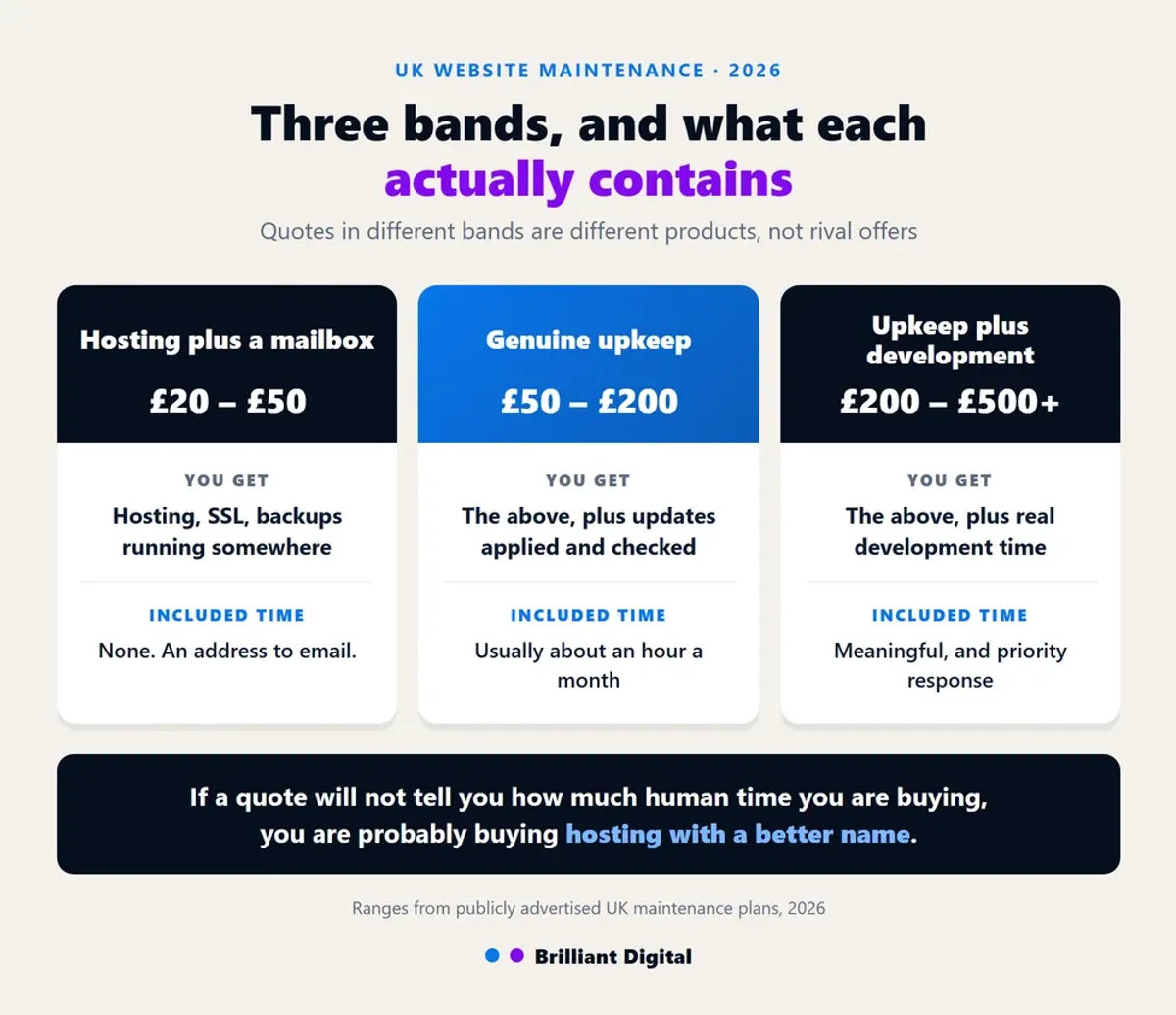
In practice, monthly website maintenance packages in the UK fall into three bands:
- Hosting plus a mailbox, £20 to £50. Hosting, SSL, backups running somewhere, and an address to email when something breaks. No included time at all.
- Genuine upkeep, £50 to £200. The above, plus platform updates applied and checked, uptime monitoring, and usually an hour or so of changes each month.
- Upkeep plus development, £200 to £500 or more. The above, plus meaningful development or marketing time, priority response, and someone who knows your site rather than your ticket number.
Two quotes in different bands are not competing offers. They are different products, and comparing them on price alone is how businesses end up paying £40 a month for years to a website maintenance company that has not logged in since the site launched.
How to work out what you are actually paying for
This is the part no maintenance article covers, because almost everyone writing them is selling a plan. Four questions will tell you most of what you need to know.
"Which of these tasks apply to my platform?" Ask for the task list and check it against the two lists above. If half of it is plugin management and your site has no plugins, half of it is theatre.
"How much human time is included, and what happens when I go over?" A number of hours and a rate. If the answer is vague, the time is probably nil.
"When did you last restore my backup?" Not "do you take backups". Everyone takes backups. Restoring one is the only proof it works.
"What happens at 9pm on a Saturday when the site is down?" The answer reveals whether you are buying monitoring or an inbox.
If the answers are good, the plan is probably fair. If they are evasive, you are likely paying a monthly fee for hosting and the option to send an email.
One further point, if you are choosing between website maintenance companies rather than auditing an existing plan. The provider who built your website is usually the cheapest option to maintain it, because they are not spending billable hours working out how it fits together. That advantage disappears the moment they stop responding, which is the real reason to check the fourth question above before you sign anything. Ask for the name of one client they have supported for more than three years, and ask that client what happens when they report a problem.

How often should website maintenance happen?
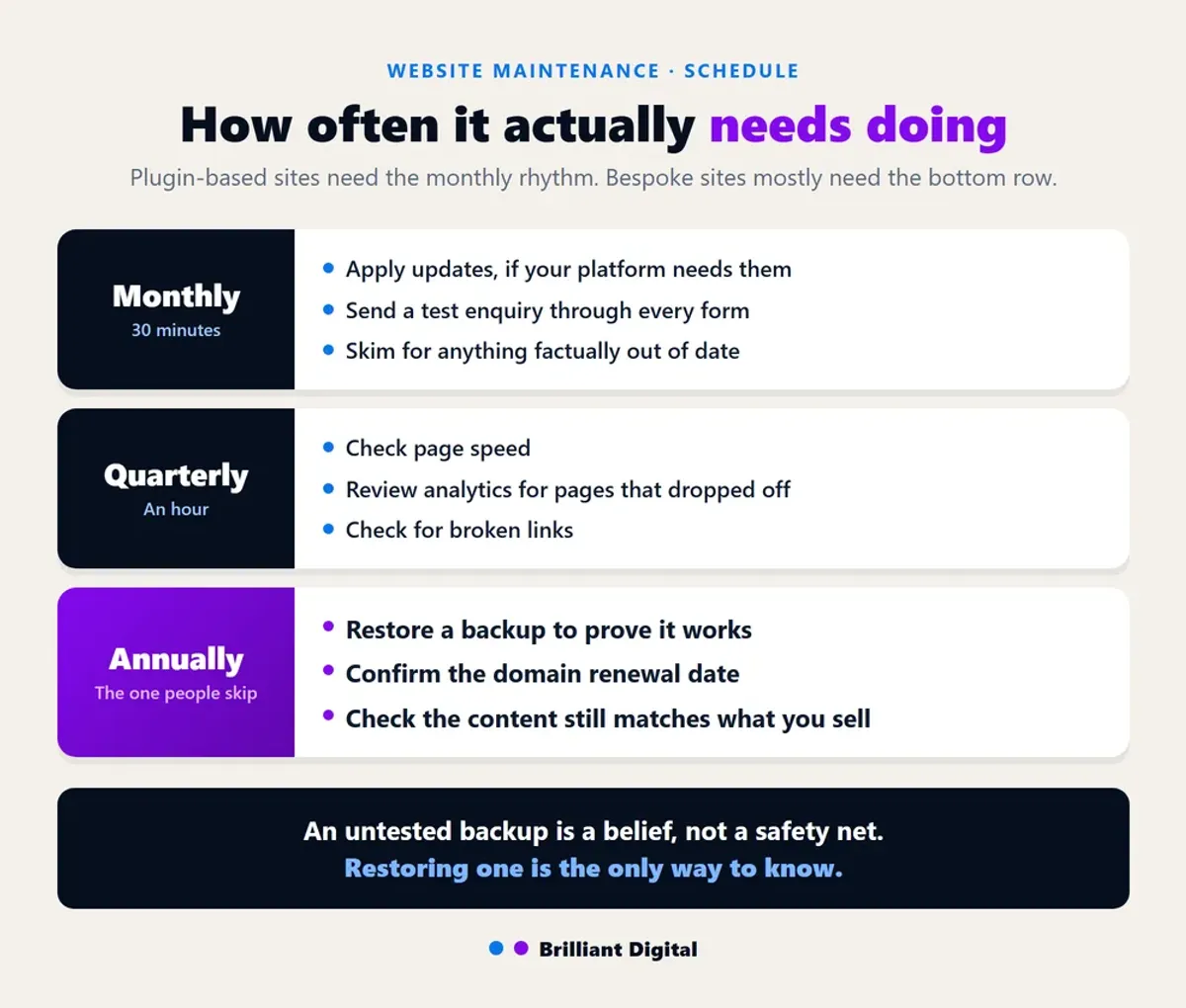
For a bespoke site, most of the work is annual or event-driven rather than scheduled. For a plugin-based site, it genuinely needs a monthly rhythm. A workable schedule looks like this:
- Monthly: apply updates if your platform needs them, send a test enquiry through every form, skim the site for anything factually out of date.
- Quarterly: check page speed, review analytics for pages that have dropped off, check for broken links.
- Annually: restore a backup to prove it works, confirm the domain renewal date, review whether the content still matches what the business actually sells.
The annual backup restore is the one almost everybody skips, and it is the one that matters most on the day something goes badly wrong.
Frequently Asked Questions
What is website maintenance?
Website maintenance is the routine work of keeping a website secure, online and accurate after launch. It covers software updates, hosting and uptime, SSL and domain renewals, backups, speed, and keeping the content correct. The amount of work involved depends heavily on what the website is built on.
How much should I pay for website maintenance?
Published UK plans run from about £30 to £500 a month, with most small business plans between £49 and £199. Judge a quote by how much human time it includes and whether its task list matches your platform, rather than by the headline figure alone.
How long does website maintenance take?
Routine monthly maintenance on a small plugin-based website usually takes one to three hours. A bespoke site with no plugin layer often needs far less, sometimes only an annual check. Larger jobs such as a content overhaul or a speed rebuild are separate pieces of work.
What is a person called who maintains a website?
Usually a webmaster, web developer or website support provider. In practice, small businesses either retain their original web agency, pay a freelancer, or handle the basic checks themselves. The title matters less than what the agreement actually covers.
Do I still need a maintenance plan if my site is not on WordPress?
You will not need plugin updates, security plugins, malware scanning or compatibility testing, so a plan sold on those tasks is not built for your site. You will still want someone available to change things, and on most modern sites that is the only part worth paying for monthly.
Who updates my website when I want something changed?
Whoever built it, a freelancer, or you, if the site was handed over with a content editor. This is separate from platform upkeep and applies on every platform. Agree before you sign how changes are requested, how quickly they happen, and what they cost.
Where to start
Find out what your website is built on, because everything above follows from that one fact and most business owners have never been told it plainly. Three ways to check, in order of effort:
- Try the login page. Type your address followed by /wp-admin. If a WordPress login screen appears, you have your answer.
- Look at the page source. Right-click the page, choose "View page source", then search it for wp-content. If it is there, the site is WordPress. Searching for webflow, shopify or squarespace works the same way.
- Just ask. Whoever built it, or whoever you pay each month, should answer in one sentence. How readily they do is itself informative.
Then work out which of the two halves you are actually buying. If the site runs on WordPress or another plugin-driven platform, the upkeep is real and worth paying for properly. If it does not, most of that task list does not apply to you, and the question becomes a simpler one: who changes things when you need them changed, and how fast?
We have built more than 150 websites since 2014. We do not sell WordPress-style maintenance plans, because we no longer build sites that generate that work. We do stay available to the businesses we build for, which is the other half.
Tell us what you have and what you are paying, and we will tell you whether it looks reasonable. No obligation, and no hard sell.
If you are weighing up a rebuild instead, our website design and development page explains how we approach it.