Local SEO is the work of making your business easy for Google to be confident about, so it shows up when someone nearby searches for what you sell.
Someone within a few miles of you searched for your service this week, and Google showed them somebody else. That business is not necessarily better than yours. It is just clearer: its details agree everywhere they appear, its Google Business Profile is filled in properly, and it has enough reviews that Google is willing to bet on it.
Local search rewards businesses that are easy to understand and punishes ambiguity. This guide covers what local SEO for a small business actually involves, what it costs, and which parts you can do yourself before you pay anyone.
Key Takeaways
- Google names three factors for local results: relevance, distance and prominence. You cannot move your premises, so relevance and prominence are the only two you can influence.
- Your Google Business Profile does more work than your website for local searches, and it is free.
- Consistency beats volume. One set of business details that agrees everywhere is worth more than fifty scattered directory listings.
- The highest-impact fixes are free. Your profile, your reviews and your details. Do those before you pay anyone.
- Google states plainly that you cannot pay for a better local ranking. Anyone selling you one is selling you something else.
What local SEO actually is
Local SEO is search engine optimisation aimed at a place rather than the whole country. The difference is geographic relevance. Ordinary SEO tries to rank you for "accountant"; local SEO tries to rank you for "accountant in Peterborough" and for "accountant near me" when the person searching is nearby.
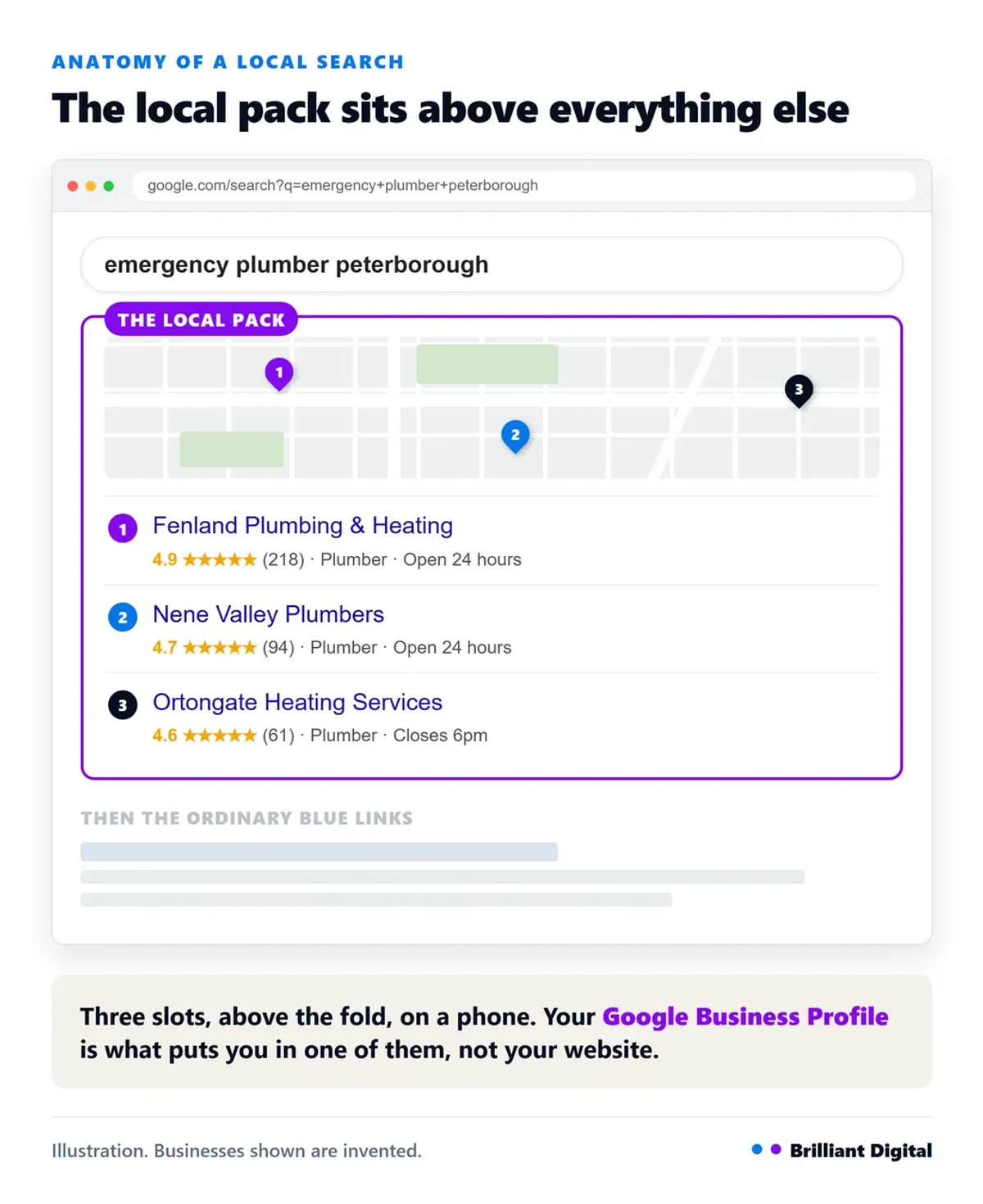
It also targets a different bit of the page. Above the normal blue links, Google usually shows a map with three business listings on it. That block is called the local pack. It sits above the organic results and takes up most of the first screen on a phone, so for anyone with a physical location or a service area it is the most valuable position on the page. Above the map sit the paid ads, and below it the ordinary blue links, which makes three separate routes onto Google, each won a different way.
How Google decides who shows up locally
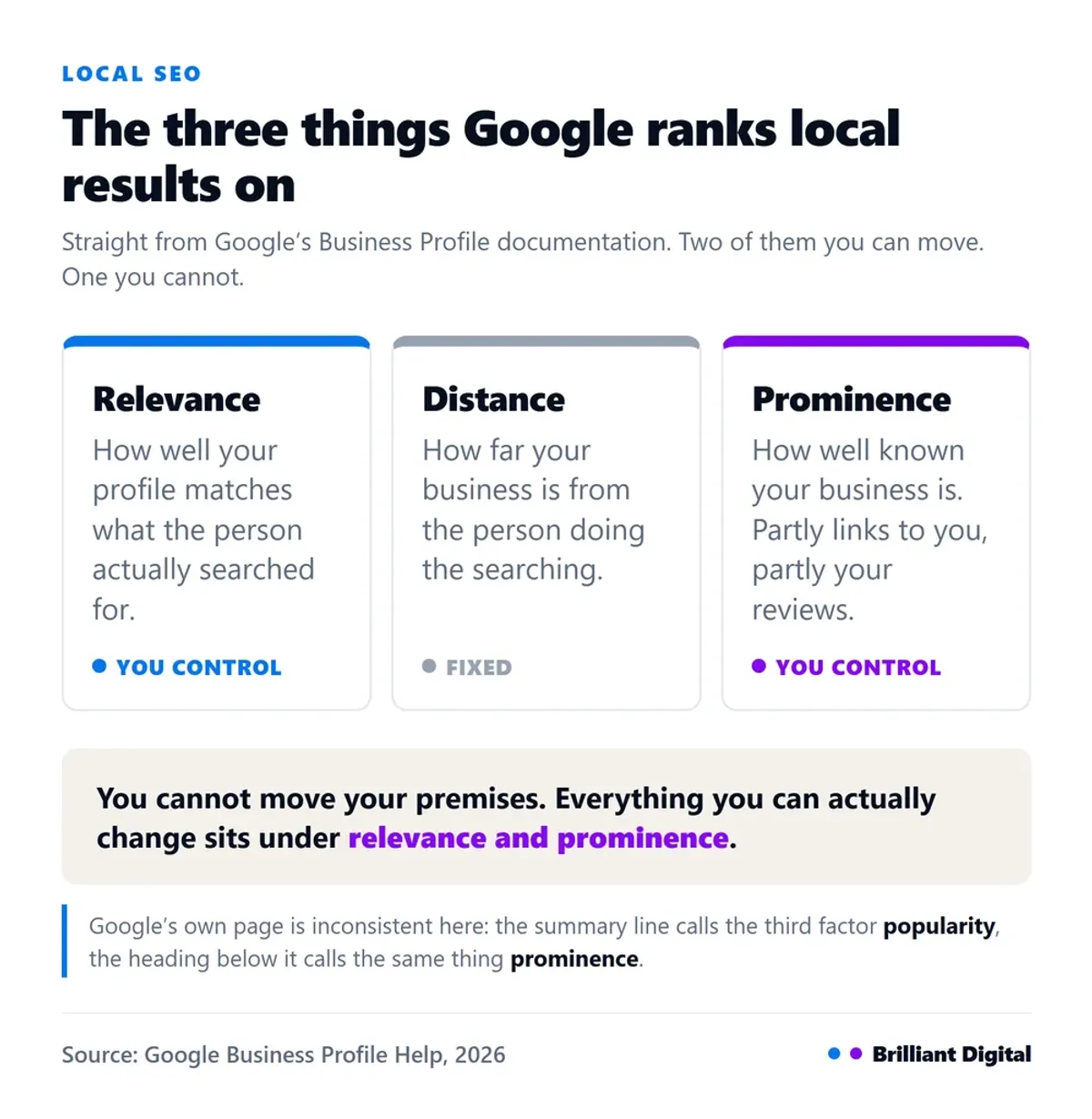
Google publishes its local ranking factors, and there are three. Relevance is how well your profile matches the search. Distance is how far you are from the person searching. The third is how well known your business is. All of it is on one page of Google's own documentation, which is worth reading yourself, because two things on it get misquoted constantly.
The first is what the third factor is called. Google's summary line says local results are "mainly based on relevance, distance and popularity", while the section heading immediately below calls the same thing prominence. Most articles pick one and present it as gospel. Google uses both, and defines it as how well known your business is, based partly on how many websites link to you and how many reviews you have.
The second is more useful. The same page states: "There's no way to request or pay for a better local ranking on Google." Keep that sentence in mind the next time somebody offers to put you in the map pack for a monthly fee.
The practical takeaway is simple. You cannot move your business closer to the person searching, so distance is fixed. Everything you can actually control sits under relevance and prominence, and that is what the rest of this guide is about.
Your Google Business Profile does most of the work
Your Google Business Profile is the highest-return thing you can fix, and it costs nothing. It feeds your Google Maps listing, the local pack and the panel on the right of the results page. For local searches it carries more weight than your website does.
The essentials, in order:
- Claim and verify it. Until you do, you have no control over what it says.
- Use your exact trading name. Not your name plus three keywords. Google removes those, and it can cost you the listing.
- Pick the right primary category. The most influential field on the profile. "Emergency plumber" and "plumber" are different categories and surface for different searches.
- Add real photos. Your premises, your van, your team, your work.
- Keep your opening hours current, including bank holidays.
It used to be called Google My Business, which is why half the internet still says GMB. The name changed in 2021.
Treat it as something you maintain, not something you set up once. We have covered it properly in the power of Google Business Profile.
Get your business details identical everywhere
Your name, address and phone number, usually shortened to NAP, need to be identical everywhere they appear online. Your website, your Google Business Profile, your social profiles, every directory. Not similar. Identical.
The reason is worth understanding, because it changes how much care you take. Google cross-references your details across the web to work out how confident it can be about you. An old listing with a phone number you stopped using four years ago is not a rules violation. It is ambiguity. And ambiguity loses to the competitor Google is certain about.
Mentions of your business on other sites are called citations, and they feed the prominence factor. Quality matters, not quantity:
- Your local chamber of commerce, and any trade body you belong to.
- The two or three directories that genuinely matter in your sector. A Checkatrade listing means something to a builder. It means nothing to a solicitor.
- Local sponsorships and community organisations you are actually involved with.
Buying a package of two hundred directory listings does not work, and never did. Five listings that agree with each other are worth more than two hundred that do not.
Location pages that are actually worth having
If you genuinely serve several towns, each one needs its own page on your website. A single page listing twelve locations will not rank for any of them.
Here is where most businesses get it wrong. They build the first page, then copy it eleven times and swap the town name. Google calls these doorway pages and treats them as spam under its search spam policies. Twelve near-identical pages do more harm than one honest page.
A location page earns its place when it contains things that are only true of that place:
- The services you actually offer there, which are not always all of them.
- A named job you have done nearby, or a customer from that area.
- Honest coverage detail: how far you travel, how quickly you can get there, whether you charge for the callout.
If you have no shopfront, just a van and a service radius, you are what Google calls a service area business. You can hide your address on your profile and set a radius instead. We wrote about this specifically for trades in local SEO for builders.
Not sure whether your website is helping or holding you back? Brilliant Digital has built more than 150 websites for UK small businesses since 2014, most of them competing locally. Tell us what you are trying to achieve and we will give you a straight answer.
Reviews: getting them, and what to do with them
Reviews feed prominence directly. Google says so on the same documentation page: more reviews and positive ratings can help your local ranking. They also decide whether the person who found you actually calls.
Most businesses never ask. That is the whole problem. Asking at the moment the job is finished, while the customer is still pleased, works far better than an email a fortnight later. Your review link is in your Business Profile dashboard, so you can send it in a text.
Reply to every review, and especially the bad ones. A calm, specific reply saying what you did about it is read by every future customer who finds that review. Silence is read too.
One warning most articles skip: do not offer anything in exchange for a review. Not a discount, not entry into a prize draw. It breaches Google's review policies and the reviews get removed, usually along with the good ones you earned honestly.
Local keywords, and content that mentions where you are
Local keywords are the terms people type when they want someone nearby. "Emergency plumber Peterborough". "Boiler repair PE10". "Family solicitor near me". Fewer people search these than search "plumber", and that is exactly why they are worth having: the ones who do are ready to pick up the phone.
Use them where they belong: page titles, headings, the opening paragraph and your URLs. Not sprinkled through every sentence.
Local content is the same idea applied to your blog, and there is a real distinction here. Writing about your town is not the same as inserting its name into a generic article. Genuinely local content references something specific: a council rule that affects your trade, a problem common to local housing stock, a job on a street people recognise.
For the on-page work that applies to every page rather than just local ones, see how to improve your Google ranking. If you are still weighing up whether any of this is worth the effort, we have made the case in why SEO matters for a small business.

Showing up in AI search, not just Google
AI Overviews now sit at the top of many local searches, and people ask ChatGPT for recommendations the way they used to ask Google. There is no separate exercise here. AI answers about local services are assembled mostly from the pages that already rank, so the work is the same work.
What changes is format. AI systems quote pages that answer a question quickly. A page that defines something in one sentence gets pulled into an answer. A page that takes four paragraphs to reach the point does not.
So say what you do, where you do it, and what it costs, in plain sentences near the top of the page. Good for AI systems, and good for humans in a hurry, which is most of them. Be sensible about the weight you give this though: it is a channel to be present in, not a reason to rebuild your website.
What local SEO actually costs, and what you can do yourself
Nobody publishes prices for this, so here is a straight answer. These are the ranges businesses tell us they are quoted in the UK. They vary by sector, and they are a guide rather than a quote.
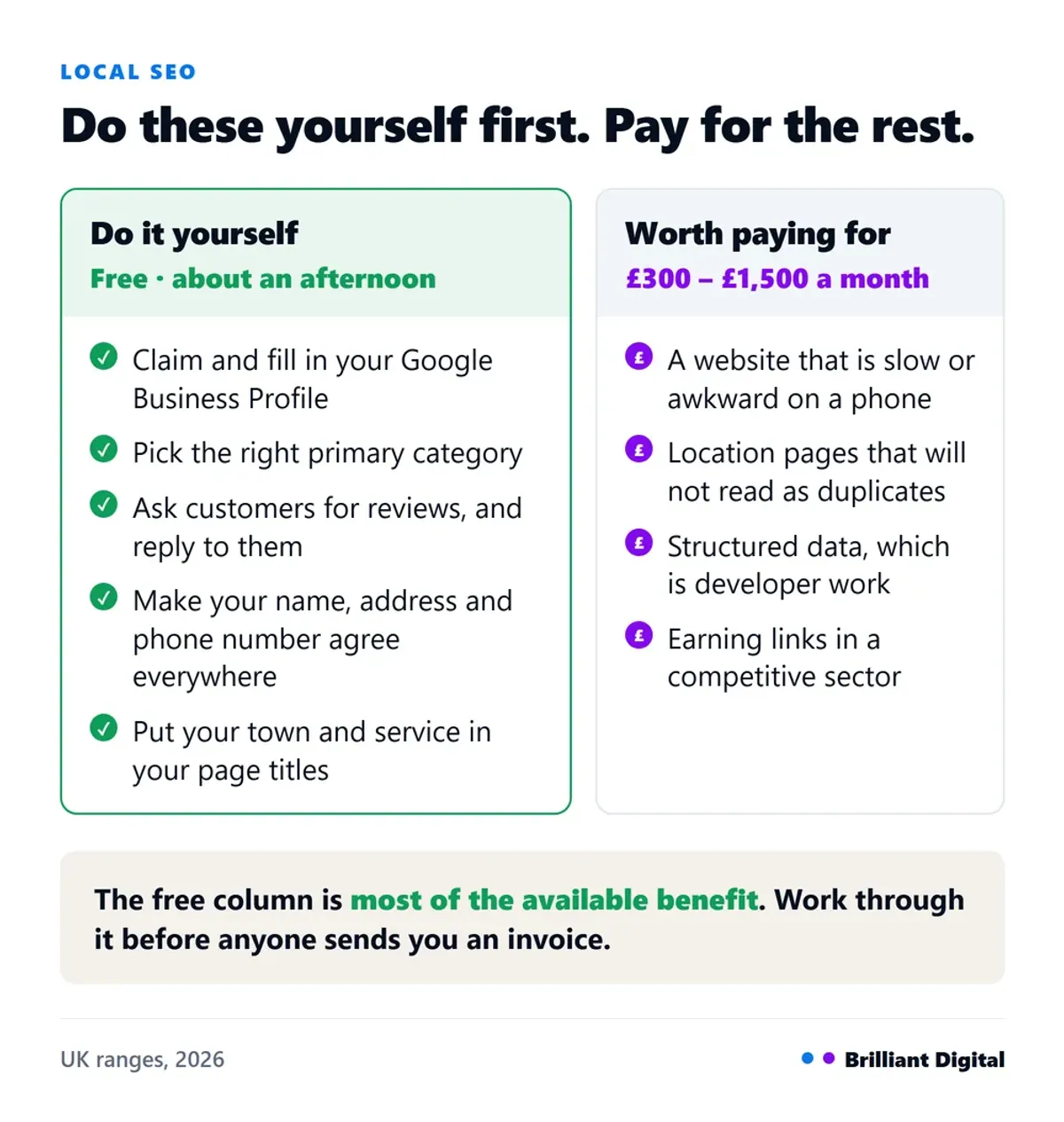
- Doing it yourself: free, plus two or three hours a month.
- A freelancer: roughly £300 to £800 a month.
- A small agency retainer: roughly £500 to £1,500 a month.
- A one-off audit and setup: roughly £500 to £2,000.
Now the more useful half. These are genuinely do-it-yourself, and worth doing before you pay anyone:
- Claiming and filling in your Google Business Profile.
- Asking customers for reviews, and replying to them.
- Fixing your NAP so it agrees everywhere.
- Adding your town and service to your page titles and headings.
That is most of the available benefit, and it costs nothing but an afternoon.
Paying usually makes sense for: a website that is slow, not mobile-friendly, or built so you cannot add location pages without them looking like spam; LocalBusiness schema and other structured data, which is developer work; earning backlinks in a competitive sector; and any market where the local pack is genuinely contested.
If you want results faster than SEO can deliver them, paid advertising is the honest alternative. We have compared the two in whether to start with ads or SEO.
The mistakes that cost people rankings
Most local SEO problems are not missing tactics. They are small inconsistencies nobody has looked at in years, and they quietly cap how confident Google is willing to be about your business. The ones we come across most often when a local business asks us why it is invisible:
- An unclaimed or half-finished profile. No category, no photos, hours from 2022.
- Details that disagree. One old listing with the wrong number undermines everything else.
- Keyword-stuffed business names. "Dave's Plumbing Peterborough Emergency 24hr" gets listings suspended.
- Bulk-bought citations, two hundred at a time, all slightly wrong.
- Duplicate location pages with the town swapped out.
- Incentivised reviews, which get removed.
- Never measuring anything, so a drop goes unnoticed for months.
That last one is the easiest to fix. Your Business Profile has a performance panel showing how people found you, and Google Search Console is free and does the same for your website. Check both once a month.
If your website is not appearing in search at all, that is a more basic problem. We have covered why your website might not be showing up.
Frequently Asked Questions
How much should SEO cost for a small business?
In the UK, expect roughly £300 to £800 a month from a freelancer and £500 to £1,500 from a small agency. One-off audits and setups run from about £500 to £2,000. Anything under £200 a month is usually automated directory submissions, which will not move local rankings.
Can I do local SEO myself?
Yes, and you should do the basics yourself before paying anyone. Claiming your Google Business Profile, filling it in properly, asking for reviews and making your business details consistent are all free and take about an afternoon. Nothing you can buy will help much until those four are done.
How much should I pay for local SEO?
Pay for the parts you genuinely cannot do: fixing a slow or badly structured website, building location pages that will not read as duplicates, and competitive link building. Do not pay a monthly retainer for directory submissions or for a guaranteed map pack position, which Google states cannot be bought.
Is SEO still worth it in 2026?
Yes, for local businesses especially. AI Overviews are assembled largely from the pages that already rank, so the work that earns a local ranking also earns the AI citation. What has changed is the format that gets quoted, not whether being findable matters. It is not quick, though. Expect months rather than weeks, which is why it is worth knowing how long SEO takes to work before you commit a budget to it.
Why is my competitor ranking above me when my business is better?
Almost always because Google understands them more clearly. Their profile is complete, their details agree everywhere, and they have more reviews than you do. Local ranking measures how confident Google is about a business, not how good that business actually is at the job.
What to do next
Start with the free things. Claim your Google Business Profile, fill in every field properly, fix your details so they match everywhere, and ask your last ten customers for a review. One afternoon, no invoice.
If you get through that list and you are still invisible, the problem is usually the website underneath: too slow, awkward on a phone, or built so that adding proper location pages is not realistic.
That part is what we do. Brilliant Digital has been building websites for UK small businesses since 2014, and we are happy to look at yours and say honestly whether it is what is holding you back. Get in touch and tell us what you are trying to achieve. No hard sell, just a straight conversation.